Dolphin Battery Saver3.1.0
Publisher Description
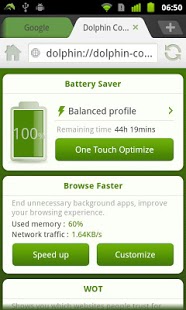
Optimize your Dolphin Browser by saving battery, browsing faster, and protecting your browsing history.
Key features:
• Battery saver: save power and extend your smartphone’s battery life with ‘One Click Optimize’.
• Browse faster: improve your browsing speed by ending unnecessary background apps.
• Security manager: protect your browsing security by receiving a warning when on a website with untrusted Web of Trust (WOT) ratings. You can also view the WOT ratings of each page.
Dolphin Battery Saver is an exclusive Add-on for Dolphin Browser. For more Add-ons, visit: http://bit.ly/AndroidAdd-onList
Have questions, feedback, or suggestions? Join the Dolphin community on:
Facebook: https://www.facebook.com/DolphinFans
Twitter: https://twitter.com/dolphinbrowser
Google+: https://plus.google.com/communities/105383868011227937315
About Dolphin Battery Saver
The company that develops Dolphin Battery Saver is Dolphin Browser. The latest version released by its developer is 3.1.0.
To install Dolphin Battery Saver on your Android device, just click the green Continue To App button above to start the installation process. The app is listed on our website since 2012-07-20 and was downloaded 7 times. We have already checked if the download link is safe, however for your own protection we recommend that you scan the downloaded app with your antivirus. Your antivirus may detect the Dolphin Battery Saver as malware as malware if the download link to com.dolphin.battery.saver is broken.
How to install Dolphin Battery Saver on your Android device:
- Click on the Continue To App button on our website. This will redirect you to Google Play.
- Once the Dolphin Battery Saver is shown in the Google Play listing of your Android device, you can start its download and installation. Tap on the Install button located below the search bar and to the right of the app icon.
- A pop-up window with the permissions required by Dolphin Battery Saver will be shown. Click on Accept to continue the process.
- Dolphin Battery Saver will be downloaded onto your device, displaying a progress. Once the download completes, the installation will start and you'll get a notification after the installation is finished.
Program Details
System requirements
Download information
Pricing
Version History
version 3.1.0
posted on 2012-07-20
* Adjusted interface design to match the latest design of Dolphin Browser.,* WOT: security improved.,* Low battery/security notification in Add-on bar.,* Various stability and performance improvement.
version 3.1.0
posted on 2012-07-20
Several fixes and updates
